Admin Features
Section titled “Admin Features”Overview
Section titled “Overview”Admins access three main areas:
- Dashboard (
/dashboard) - Receipt management - Batch Review (
/batch-review) - Rapid approval workflow - Users (
/users) - User management
Dashboard
Section titled “Dashboard”Access
Section titled “Access”Route: /dashboard
Auth: Admin role required (redirects employees to /employee)
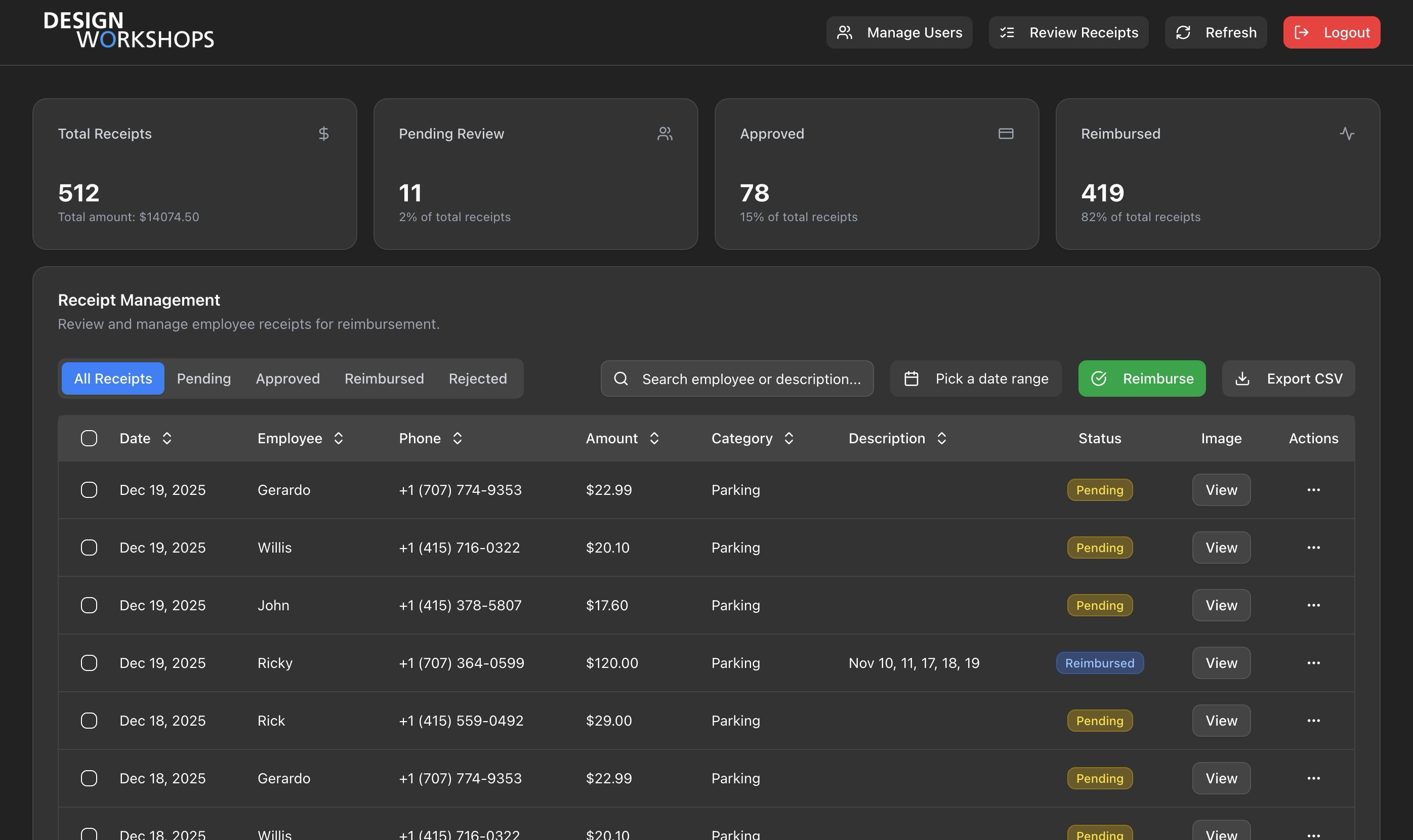
Features
Section titled “Features”| Feature | Description |
|---|---|
| View All Receipts | See receipts from all employees |
| Filter by Status | Tabs: All, Pending, Approved, Reimbursed, Rejected |
| Date Range Filter | Filter by receipt date |
| Search | Search employee name or description |
| Edit Any Receipt | Change date, amount, category, notes, status |
| Delete Any Receipt | Remove receipt and image |
| Bulk Reimburse | Mark all approved as reimbursed |
| Export CSV | Download payroll totals |
Summary Cards
Section titled “Summary Cards”Dashboard shows 4 stat cards:
- Total Receipts: Count and total amount
- Pending Review: Count and percentage
- Approved: Count and percentage
- Reimbursed: Count and percentage
Bulk Reimburse Flow
Section titled “Bulk Reimburse Flow”1. Click "Reimburse" button2. System counts all approved receipts3. Confirmation dialog shows count4. Confirm → PUT /api/receipts/bulk-update5. All approved → reimbursedImportant: Affects ALL approved receipts globally, not just filtered ones.
CSV Export
Section titled “CSV Export”Exports payroll-ready totals grouped by employee:
LastName,FirstName,EmployeeNumber,TotalAmountDoe,John,EMP123,150.00Smith,Jane,EMP456,275.50- Uses
filteredReceipts(respects current filters) - Groups by
employee_id_internal - Sums amounts per employee
Key Files
Section titled “Key Files”| File | Purpose |
|---|---|
app/dashboard/page.tsx | Auth protection |
components/receipt-dashboard.tsx | Dashboard UI |
components/receipt-table.tsx | Receipt table |
hooks/use-admin-receipts.ts | Data fetching |
Batch Review
Section titled “Batch Review”Access
Section titled “Access”Route: /batch-review
Auth: Admin role required
Purpose
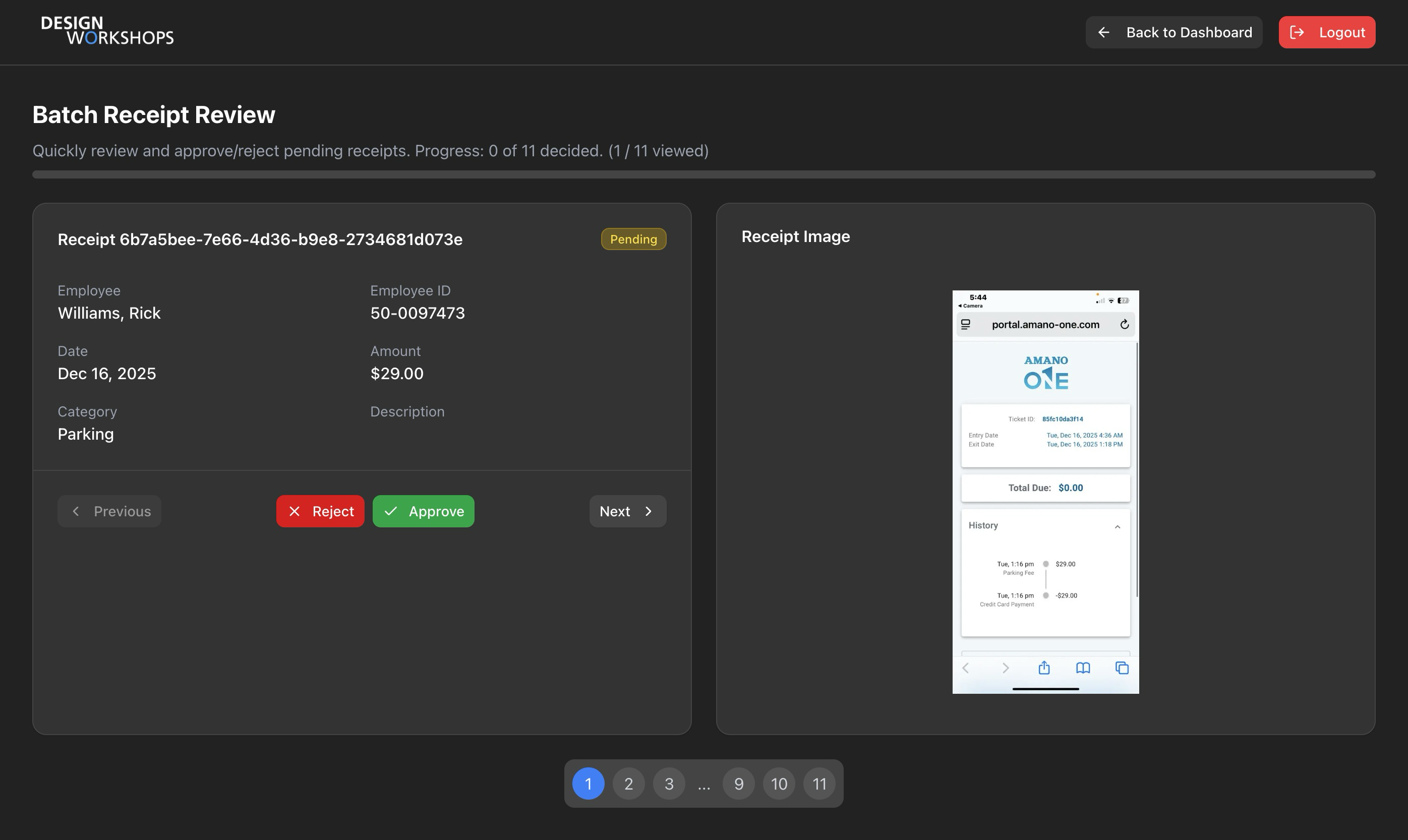
Section titled “Purpose”Rapid approval workflow for reviewing pending receipts one at a time.
1. Load all pending receipts2. Display one receipt at a time3. Admin clicks Approve or Reject4. Navigate to next receipt5. After all reviewed, submit decisionsUI Layout
Section titled “UI Layout”| Panel | Content |
|---|---|
| Left | Receipt details (date, amount, category, employee) |
| Right | Receipt image |
| Bottom | Navigation dots showing progress |
Navigation
Section titled “Navigation”- Previous/Next: Move between receipts
- Dots: Click to jump to any receipt
- Color coding: Blue (current), Green (decided), Gray (undecided)
Decision States
Section titled “Decision States”Decisions stored locally until submission:
{ "receipt-id-1": "approved", "receipt-id-2": "rejected", // ...}Completion Screen
Section titled “Completion Screen”After reviewing all receipts:
- Shows summary (X approved, Y rejected)
- “Review My Decisions” - go back and change
- “Submit X Decisions” - finalize
Submission
Section titled “Submission”Submits all decisions in parallel:
await Promise.all( Object.entries(decisions).map(([id, status]) => supabase.from('receipts').update({ status }).eq('id', id) ));Key Files
Section titled “Key Files”| File | Purpose |
|---|---|
app/batch-review/page.tsx | Auth protection |
components/batch-review-dashboard.tsx | Batch review UI |
User Management
Section titled “User Management”Access
Section titled “Access”Route: /users
Auth: Admin role required
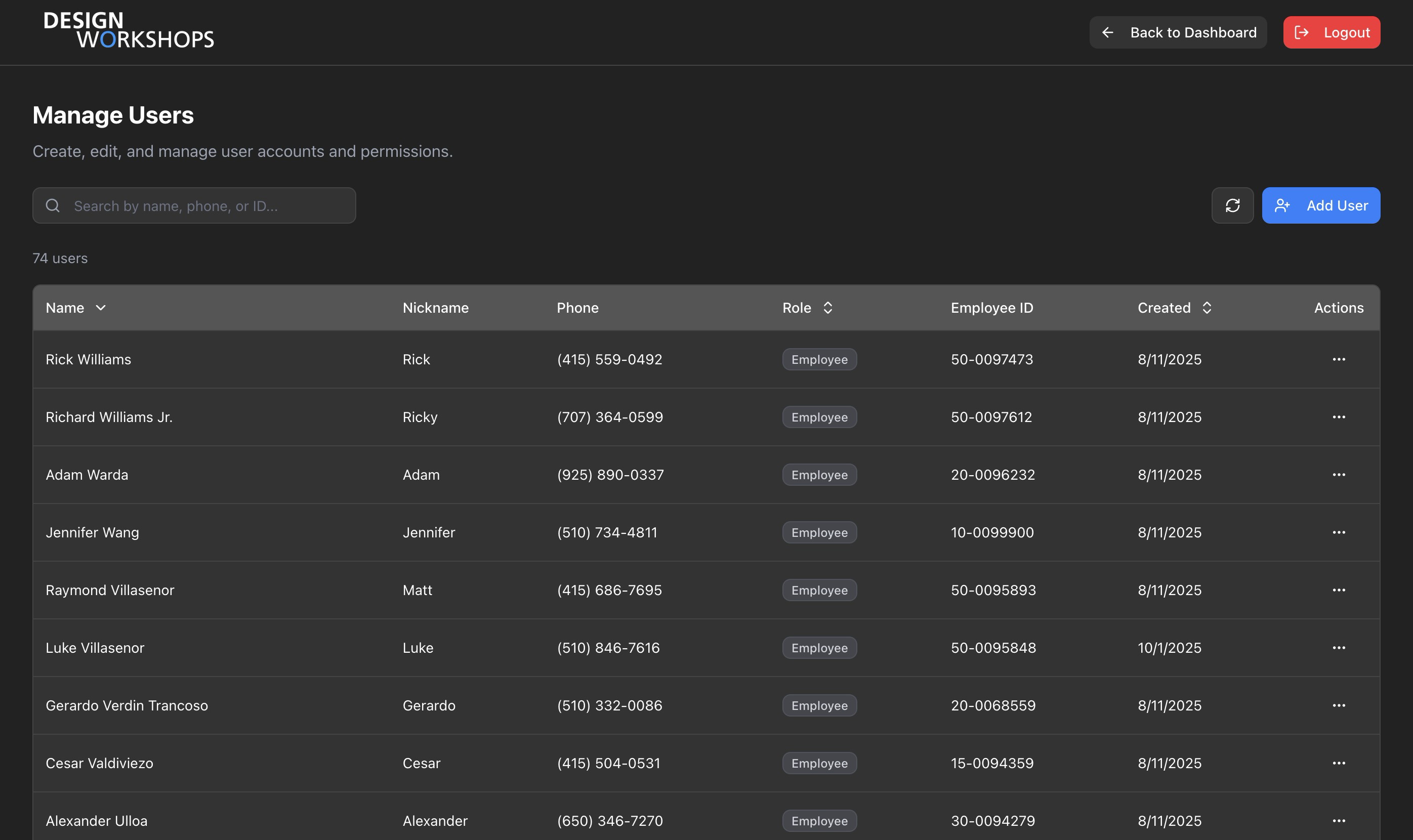
Features
Section titled “Features”| Feature | Description |
|---|---|
| List Users | Paginated user list with search |
| Create User | Add new employee or admin |
| Edit User | Update name, phone, role |
| Ban User | Soft delete (100-year ban) |
Create User
Section titled “Create User”Required fields:
- Phone number (10-digit US)
- Full name
Optional fields:
- Preferred name
- Employee ID
- Role (defaults to employee)
Edit User
Section titled “Edit User”Can change:
- Phone number (triggers global sign out)
- Full name / Preferred name
- Employee ID
- Role (employee ↔ admin)
Ban User
Section titled “Ban User”- Sets
banned_untilto ~100 years - Sets
deleted_atin user_profiles - Signs out user globally
- Cannot ban yourself
Key Files
Section titled “Key Files”| File | Purpose |
|---|---|
app/users/page.tsx | Auth protection |
components/user-management-dashboard.tsx | User management UI |
components/user-table.tsx | User list |
components/user-form-modal.tsx | Create/edit form |
components/ban-user-dialog.tsx | Ban confirmation |
Admin API Endpoints
Section titled “Admin API Endpoints”| Endpoint | Method | Purpose |
|---|---|---|
/api/admin/receipts | GET | All receipts with phone |
/api/admin/users | GET | User list |
/api/admin/users | POST | Create user |
/api/admin/users/[id] | GET | Single user |
/api/admin/users/[id] | PATCH | Update user |
/api/admin/users/[id] | DELETE | Ban user |
/api/receipts/bulk-update | PUT | Bulk reimburse |
All admin endpoints verify:
- Valid session exists
- User role is
admin
Related Pages
Section titled “Related Pages”- API - Endpoint details
- Authentication - Access control
- Receipts - Receipt status lifecycle